Latest APK

Jalwa Game Download – Latest APK & Installation Guide

With a simple Jalwa Game download process, the platform is easy to use and accessible for beginners or newbies. After downloading the app and completing the installation process, users can access their accounts, browse through the available sections, manage their profiles, and explore other features available on the platform.

This guide tells you everything you need to know about downloading. Users can learn about the way to download, the installation steps, the basic requirements before downloading, the common problems in downloading the app, and their solutions. Follow the instructions given below, just in case you are confused about the steps to download, install and use the app on the Android device safely.

Latest APK

  • Fast Download
  • Secure Installation
  • Android Supported
  • Easy Setup
Download Now

How to Download the Jalwa Game App?

Just follow these simple steps to get the game app on your device. It is fast, straightforward, and just a matter of minutes.
Method 1: Using the Download Icon

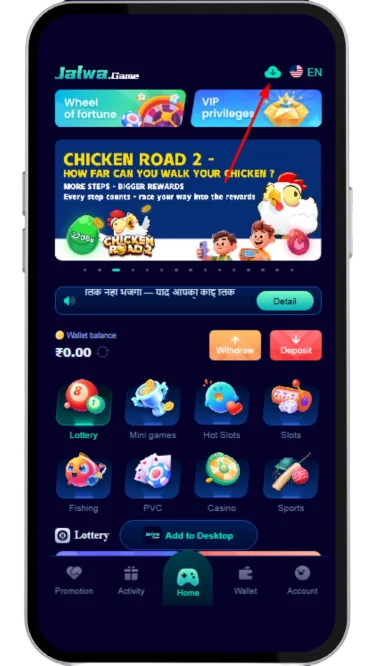
  1. Enter the Jalwa game dashboard.
  2. Tap on the download icon given in the top right corner of the home page.
    Tap on the download icon
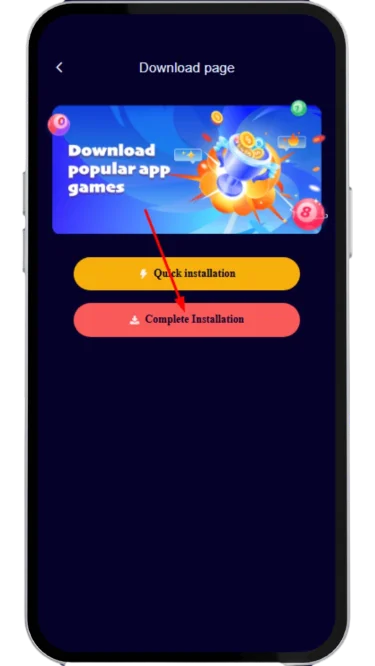
  3. Now, a new page will open with two different options to download: Quick Installation and Complete Installation.
  4. Click on the “Complete Installation” option, and the APK file will start downloading.
    Click on the Complete installation
  5. After it completes, you can install it using the step-by-step process given below.

Method 2: Using the “Add to Desktop” Option

To complete the Jalwa app download with this method, follow these steps:
  1. Log in and access the game account.
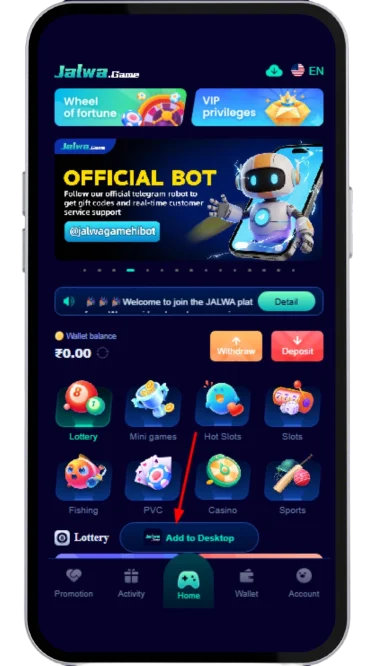
  2. The "Add to Desktop" is located at the bottom centre of the screen on the home page for users. Click on it.
    Click on the Add to desktop button
  3. A page with two options: Quick Installation and Complete Installation will open. Select the Complete Installation option.
  4. The APK will begin to download on the user’s device.
  5. Once the download is finished, a user can install the file on the device and have fun playing exciting games.

How Users Can Install the Jalwa Game App?

Once the APK file has been downloaded, it must be installed manually to use it. Here is how you can do it:

  1. Go to the device file manager or files folder.
  2. Click on the downloaded file and open it.
  3. Click on the Install option.
  4. Go to the device Settings and allow the Installation from Unknown Sources option, if your device asks for permission to install.
  5. Now, click again on the install option and wait until it completes.

After installing the app successfully, users can launch it and start enjoying the games.

Requirements Before Downloading and Installing

There are many points that should be remembered before installing and downloading the Jalwa Game APK. These are as follows:

  • Ensure you have good storage on your phone or any device.
  • You should have a stable and strong internet connection.
  • The app should be downloaded only from the official source.
  • Do not download or use any third-party and unknow link/files.
  • Make sure the Installation from unknown sources is enabled in phone settings.

These conditions may prevent any problems during installation and keep your device safe.

Common Download Issues and Their Solutions

Users may experience technical difficulties while completing the Jalwa Game app download and installing the mobile application.

These challenges are likely to occur due to the phone, the internet connection, or the app. The majority of them are resolvable by you with a little bit of troubleshooting.

1. App Not Downloading

It may happen due to the following possible reasons:

  • Slow or unstable internet connection.
  • Not enough storage on the device.
  • Temporary network interruption.

Solution:

  • Use a secure Wi-Fi or cell phone signal.
  • Check if there is enough storage in the device.
  • Check your network connection and repeat the download process.

2. Incomplete Installation

This may happen while installing the Jalwa APK due to the following possible reasons:

  • The installation process is stopped.
  • The download is incomplete or corrupted.
  • The installation is prevented due to device settings.

Solution:

  • Remove the incomplete installer and reinstall from the official website.
  • Reboot the device and then make an attempt again.
  • If there is any possibility that it can be installed, make sure the device settings permit the installation.

3. The App is Not Opening

It could happen due to the following reasons:

  • Temporary software glitch.
  • Outdated application version.
  • Device compatibility issues.

Solution:

  • Reboot the phone and open the app again.
  • If the issue persists, complete the Jalwa APK download process again and install the latest version of the app.
  • Check the minimal system requirements of your phone.

4. Login Problems

Reasons may be the following:

  • Incorrect login credentials.
  • Temporary server or network problems.
  • Forgotten password.

Solution:

  • Check that the data entered is correct.
  • Check the internet connection.
  • If the user forgot their account password, use the password recovery feature provided on the login page.

5. Slow Performance

Possible reasons may be:

  • Low available device memory.
  • Multiple applications are running in the background.
  • Poor internet connectivity.

Solution:

  • Close other applications that are not in use right at the moment.
  • Restart the device to free system resources.
  • Works better with an active internet connection.

6. App Crashes Unexpectedly

Jalwa game app can crash for the following reasons:

  • Temporary software errors.
  • Corrupted application data.
  • Outdated operating system.

Solution:

  • Restart the application.
  • Empty the cache on your device, if possible, with the App.
  • Keep device software and apps up to date.

7. Insufficient Storage Space

Possible reasons may be the following:

  • The device's storage is nearly full.

Solution:

  • Clear out surplus files or programs and free up the space.
  • Make sure that there is enough room before attempting another installation.

8. Security Warning during Installation

Possible reasons for this can be:

  • Security or verification settings on the device.

Solution:

  • Read the warning thoroughly, and only use it if you are sure that the application is from the official source.
  • Do not get application files from websites you don't know or don't trust.

Conclusion

Jalwa Game download provides a simple and hassle-free method for users to play exciting games on their Android phones. The app is lightweight, easy to set up, and suitable for both novices and experienced users who love playing through a mobile app instead of a web browser.

The user needs to download the APK from the official website only and needs to follow the instructions for a safe and smooth installation. Users profit from having the latest features, performance improvements, and an overall better gaming experience. After the installation, you can launch the app and find the list of games without any difficulties.

Frequently Asked Questions

Can the app be downloaded for free?

Yes, the Jalwa game APK download is absolutely free to download from the official source.

Is the app compatible with any Android device?

Yes, the application works well on most Android devices that fulfil the minimum requirements to ensure the installation and smooth performance.

What should users do after installing the Jalwa app?

After the installation is complete, users can open the app and log in to their account. If they do not have an account yet, they can register directly through the app.

What should users do if the app fails to install?

They should verify the storage space on their device, make sure “Install from unknown sources” is turned on, and then attempt to install the Jalwa APK once more.